Preset to LUT in 3 Clicks.
Right Inside Lightroom.
Convert any Lightroom preset to a production-ready .cube LUT — directly from Lightroom Classic. Same look in DaVinci Resolve, Premiere Pro, or Final Cut.
With Preset to LUT
Library → Plug-in Extras → Export Preset to LUT → Done.
Three clicks. One LUT. Every editor.
Open Plugin
In Lightroom Classic, go to Library → Plug-in Extras → Export Preset to LUT.
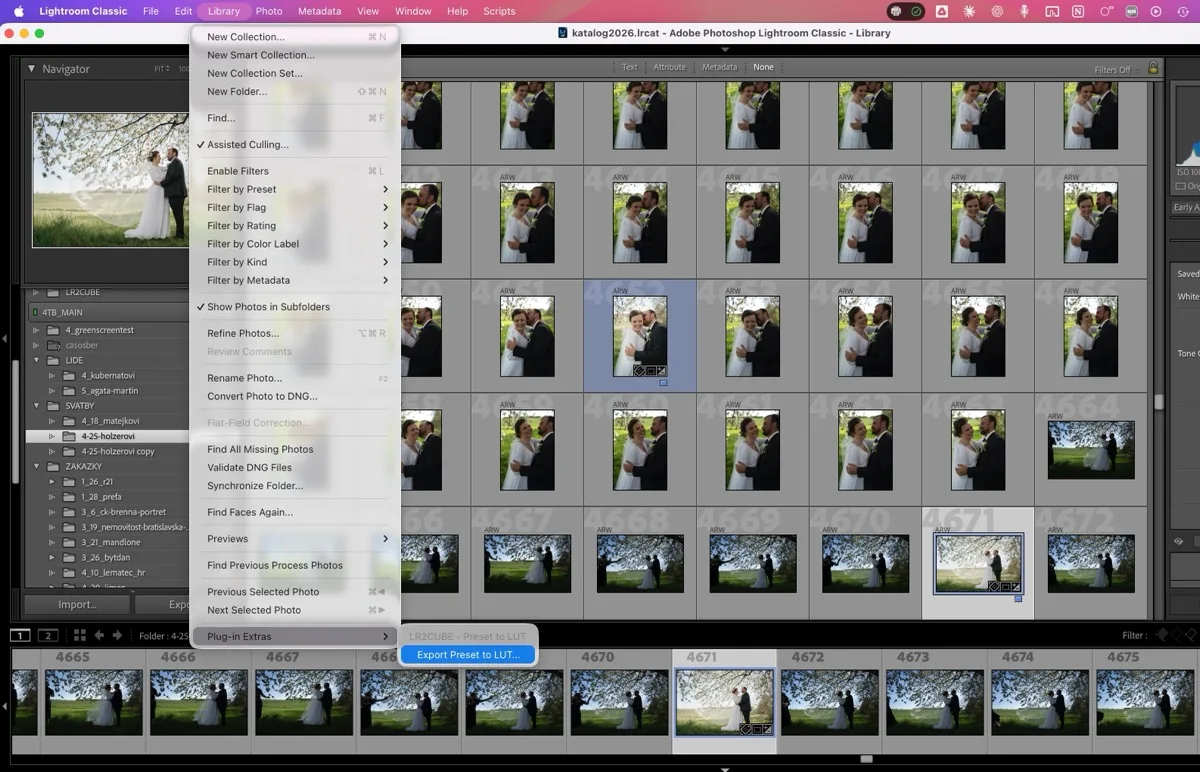
Choose Preset
Select any Lightroom preset — XMP or LRTemplate. The plugin reads all your develop adjustments.
Export LUT
Get a production-ready .cube LUT file. Drop it into DaVinci Resolve, Premiere Pro, Final Cut Pro — instant color match.
Why This Matters
If you shoot photo and video (and more photographers do every year), color consistency across formats is a constant headache. Manually matching your Lightroom look in Resolve takes time, skill, and patience. A LUT converter eliminates the guesswork entirely.
Download for free
Preset to LUT Converter is completely free. No limits, no trials. Download it and start using your Lightroom look in every video editor.